Today we will dive into the “Class loader subsystem”, but one thing you need to know is that “Class Loader Subsystem” is not an official term in the JVM Specification. In the official JVM Specification (for example, Java SE 21), chapter 5 is simply called:
Loading, Linking, and InitializingThe JVM specification describes processes, not architectural subsystems.
So for convenience, architectural overview, and educational purposes (most blogs on the internet still use this term), the title of my blog uses “Class loader subsystem”, but throughout this blog we will focus specifically on the three-step process of the JVM. This foundation will help you understand application performance, optimize systems, and debug class loading issues more effectively.
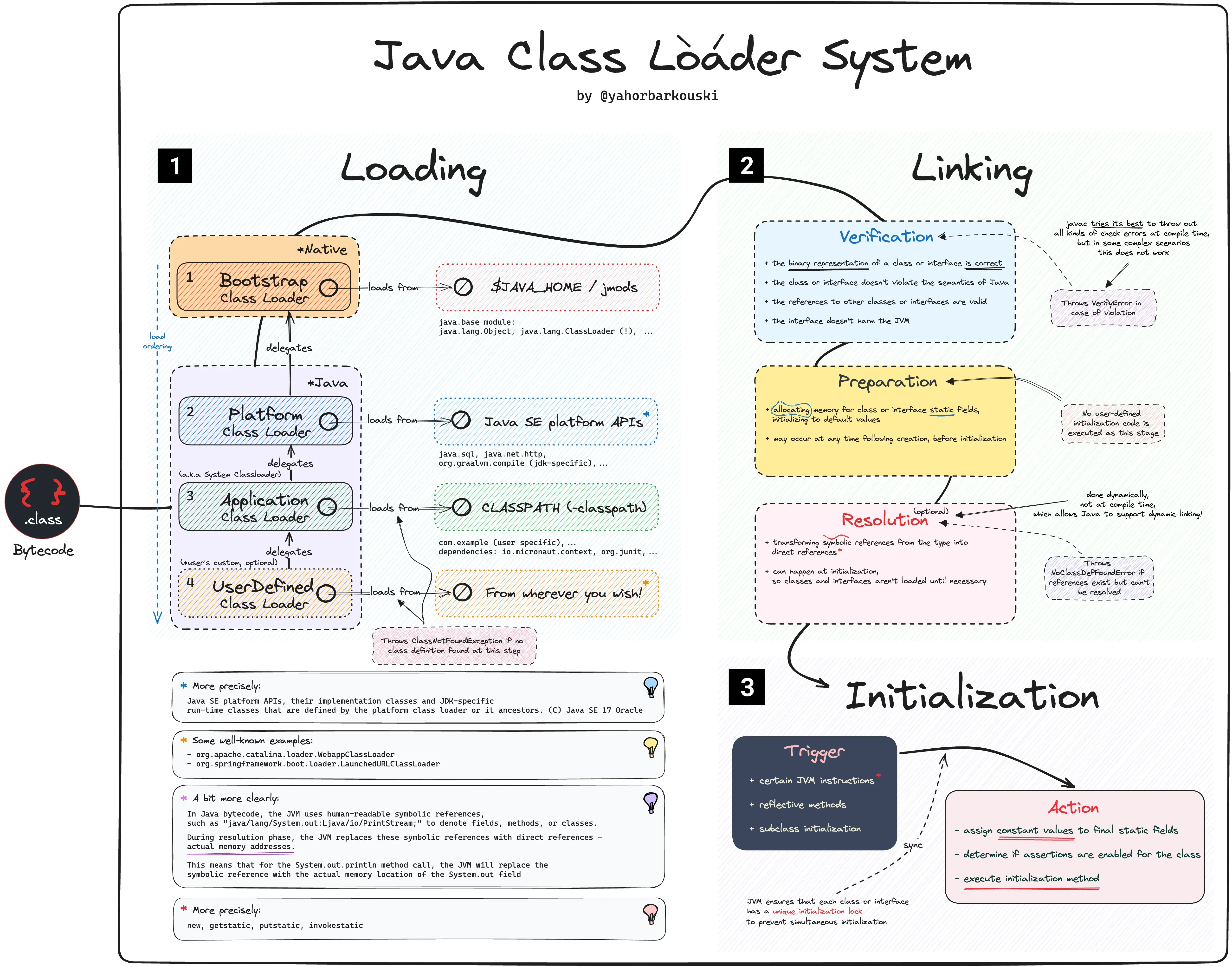
The real “meat” of the JVM start-up process begins here, and it involves several key steps:
Load → Link (Verify → Prepare → Resolve) → InitializeLet’s go through the three phases one by one.
I. Class Loading
In the JVM specification, it is defined as:
Loading is the process of finding the binary representation of a class
or interface type with a particular name and creating a class or interface from
that binary representation
In simple English, this is the process of loading a class from its binary representation (usually a .class file) into memory so that it can be executed by the JVM. The JVM needs a structured, in-memory representation of the class in order to execute it.
One of the great powers of the JVM, and why it has become such a widely used platform, is its ability to dynamically load classes, allowing the JVM to load classes that have been generated on-demand during the JVM’s runtime. This ability is used by many popular frameworks and tools, for example Spring and Mockito.
But who actually goes and finds the bytes? That’s the job of a class loader, and the JVM ships with three of them arranged in a hierarchy:
        Bootstrap ClassLoader   (parent = null, native code)
              │   loads core java.* / JDK modules (rt.jar in older JDKs)
              ▼
        Platform ClassLoader     (was "Extension" before Java 9)
              │   loads JDK extension / platform modules
              ▼
        Application ClassLoader   (a.k.a. System ClassLoader)
              │   loads your app classes from the classpath
              ▼
        (optional) Custom ClassLoaders
These loaders don’t work independently. They follow the Parent Delegation Model: when a loader is asked to load a class, it doesn’t try itself first — it delegates up to its parent.
- The Application loader is asked to load a class.
- Before doing anything, it asks its parent (Platform) to load it.
- Platform asks its parent (Bootstrap).
- Bootstrap tries first. If it can load the class (e.g.
java.lang.String), done. - Only if no parent can find the class does the child loader try to load it itself.
load("com.myapp.Service")

Application ──delegate──▶ Platform ──delegate──▶ Bootstrap
                                                    │ not found
Application ◀──can't──── Platform ◀──can't────── ──┘
     │ found in classpath → loads it
     ▼
Why does this matter? Security and consistency. Because every load goes up to Bootstrap first, you can never replace a core class. If you write your own java.lang.String, the Application loader will still delegate up, Bootstrap will return the real java.lang.String, and your spoofed version is ignored. Core classes are also loaded exactly once instead of being duplicated across loaders.
Parent delegation = “always ask your parent first” — it keeps the core JDK classes safe and unique.
To better understand the process of Class Loading, we need to take a look at HelloWorld as the JVM would see it:

All classes, at some point, extend java.lang.Object. In order for the JVM to load HelloWorld, it first needs to load all the classes that HelloWorld explicitly and implicitly depends on, for example java.lang.Object:
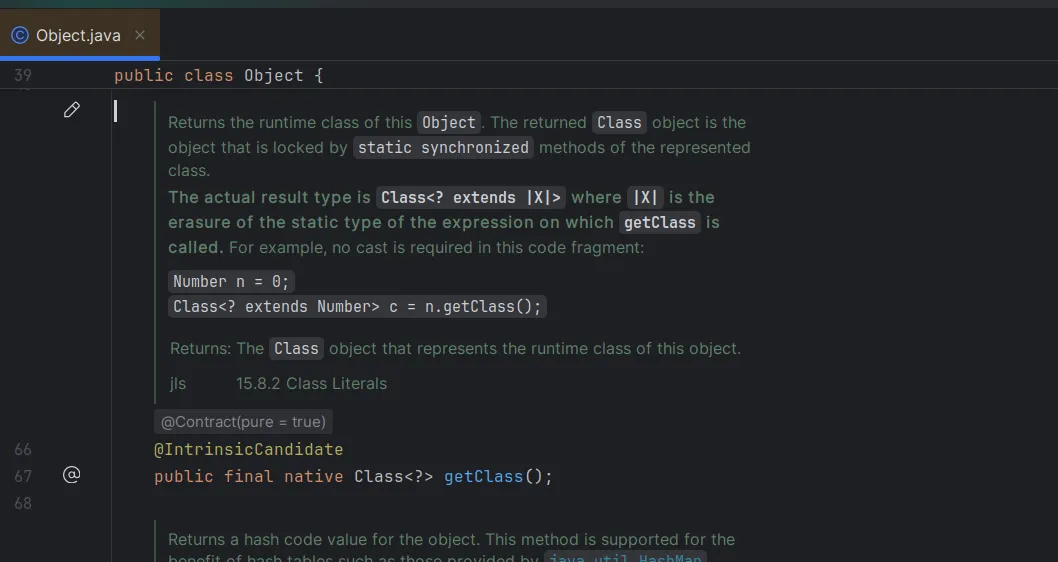 Note the important method
 public final native Class<?> getClass(), which references another class: java.lang.Class. Inside the Object class, we see it implements several interfaces, as well as some of the same interfaces as java.lang.String: java.io.Serializable and java.lang.constant.Constable.
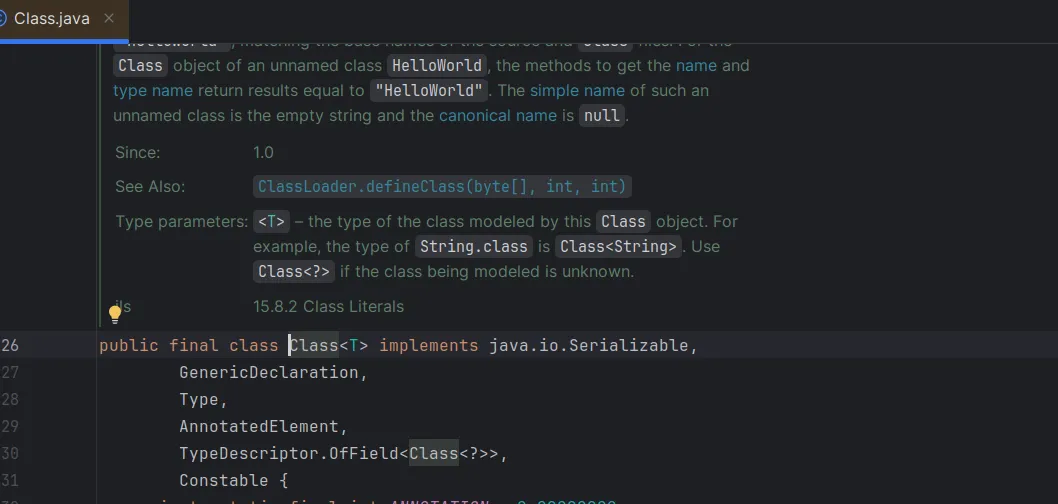
After looking at the JVM logs (by running the precompiled bytecode: java -Xlog:class+load=info:file=jvm_run.log HelloWorld), we see that the interfaces are once again loaded in the order they are defined before java.lang.Class is loaded, except for java.io.Serializable and java.lang.constant.Constable, as they had already been loaded while loading java.lang.String.
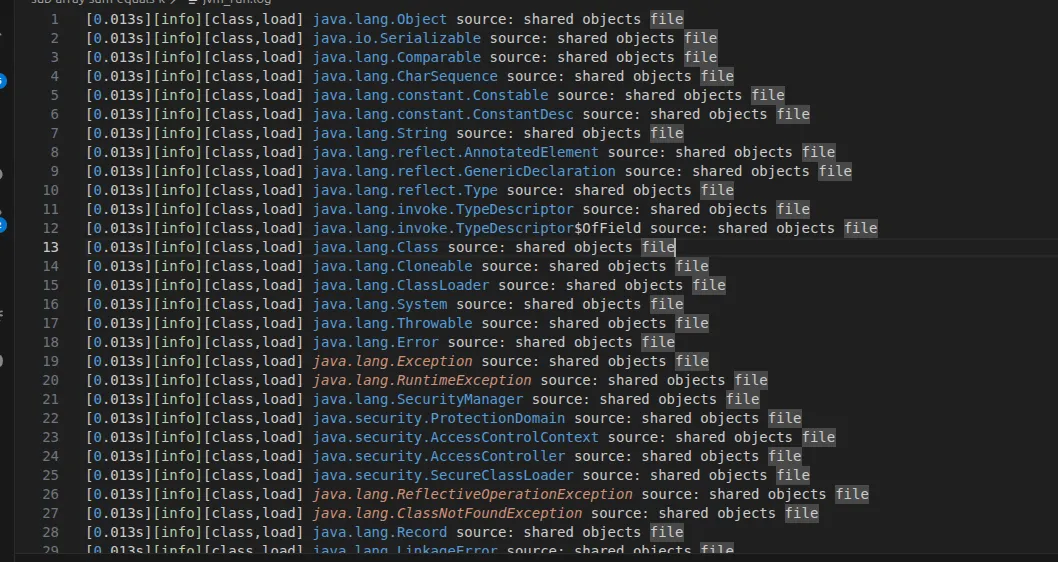
I also found that the JVM loads some 445 classes in the HelloWorld scenario — it’s doing a lot of work, right?
You may wonder, with so many classes loaded, why startup is still fast. There are two reasons which I investigated:
- 441 of the 445 come from the CDS (Class Data Sharing) archive (“shared objects file”), which is why startup is fast — they’re memory-mapped, not parsed from jars.
- 💡 Generally the JVM follows a lazy strategy for its processes, in this case Class Loading. A class is typically only loaded when it is actively referenced by another class. You get three very concrete wins from this:
Startup is fast, because a typical app/service declares far more classes than any single request will ever touch, and the JVM skips all the ones nobody asked for.
Memory stays lean, because Metaspace only ever holds the classes you actually exercised, not every class sitting on the classpath.
Dynamic loading becomes possible. The JVM loads classes on demand, not all at startup. This means the set of loaded classes is not fixed when the application starts — a class can be loaded later, the first time it is referenced, for example:
- when creating a new object instance
- when invoking a static method
- when accessing a field
- during reflective lookups
- when the JIT Compiler optimizes execution paths
This enables several important capabilities:
- Load plugins at runtime (runtime extensibility). Applications such as IntelliJ IDEA and Jenkins can discover and load new plugin JARs without restarting the entire application.
- Load implementations dynamically. For example, an application can choose and load a particular implementation of an interface (such as a
DataSourceimplementation or a JDBC driver) based on configuration or runtime conditions. - Support hot deployment through custom class loaders. Frameworks such as Spring Boot DevTools do not replace already loaded classes. Instead, they create a new class loader and reload the application’s classes through it, while discarding the old class loader. This gives the appearance of updating code without restarting the JVM.
II. Class Linking
Once a class is loaded, it must be linked into the running JVM. Linking has three sub-steps.
Verification — the process of ensuring the class or interface is structurally correct: valid constant pool, no illegal jumps, types used correctly, no stack overflows/underflows. This is the JVM enforcing the “Security” benefit we mentioned in Part 1 — untrusted bytecode can’t break out and corrupt the runtime. This process also kicks off the loading of other classes if needed, though classes loaded as a result aren’t required to be verified or prepared themselves.
Returning to the topic of CDS, in most normal situations JDK classes will not actively go through the Verification step. This is because one of the benefits provided by CDS is that the classes contained within the archive have already been verified, reducing the work the JVM needs to do on start-up and, as a result, improving start-up performance. (The details of CDS are outside the scope of this article.)
Preparation — Memory is allocated for static fields and they are set to their default values — 0 for numbers, false for booleans, null for references. Note: not the values you wrote in code yet. That comes later.
Resolution — Symbolic references in the constant pool (names like "java/lang/String") are replaced with direct references to the actual loaded types. This step can be done lazily — the first time a reference is actually used.
III. Class Initialization
The JVM runs the class’s static initializers and assigns static fields their real values — the ones you actually wrote.
This is the key contrast with the Preparation step:
public class Config {
    // Prepare:    counter = 0    (default)
    // Initialize: counter = 42   (real value)
    static int counter = 42;

    static {
        System.out.println("Config is being initialized!");
    }
}
During Prepare, counter is 0. Only during Initialize does it become 42 and the static {} block run.
Initialization is triggered the first time the class is actively used, for example:
- creating an instance (
new Config()), - accessing a static field or method,
- or loading it reflectively (
Class.forName("Config")).
Preparation gives static fields their default values; Initialization gives them their real values and runs static blocks — and it only happens on first active use.
IV. How does the Spring Framework benefit from the Class loader mechanism?
Everything above might feel academic, but it is exactly the foundation Spring is built on. Spring leans heavily on dynamic class loading + reflection — the JVM’s ability to load and inspect classes at runtime rather than at compile time. Here are four places it shows up.
1. Component scanning — When you use @ComponentScan (implied by @SpringBootApplication), Spring walks the classpath under your base package, reads each class’s metadata, and finds the ones annotated with @Component, @Service, @Repository, @Controller, etc. It then loads only those candidates and registers them as bean definitions. No class loading + reflection → no scanning.
2. Loading @Configuration classes — Your @Configuration classes are loaded and parsed into bean definitions. Spring also wraps them in a CGLIB-generated dynamic subclass (itself a class loaded by a class loader at runtime) so that calling one @Bean method from another returns the same singleton instead of a brand-new object.
3. Bean loading / instantiation — When the container creates a bean, it starts from the loaded Class<?> object and instantiates it reflectively — invoking constructors and injecting dependencies it discovered by inspecting the type. The bean you @Autowired was never wired by you at compile time; the JVM’s reflection did it at runtime.
4. Auto-configuration — Spring Boot’s “magic” is really a class-loading trick. It reads META-INF/spring/org.springframework.boot.autoconfigure.AutoConfiguration.imports (older versions used spring.factories) to find candidate configuration classes, then conditionally applies them with annotations like @ConditionalOnClass. That condition literally means “is this class present and loadable on the classpath?” — if DataSource is on the classpath, configure a datasource; if not, skip it. That is class loading being used as a feature toggle.
Component scanning,
@Configuration, bean creation, and auto-configuration are all the same idea wearing different hats: load classes at runtime, inspect them with reflection, decide what to do.
One last gotcha: why does Spring Boot make you restart?
If the JVM can load classes dynamically, here’s a fair question: why do you have to restart the app after editing a config class?
Three things get in the way, and two of them are lessons from earlier in this post:
- The JVM has no standard “unload class” button. Once a class is loaded into a loader, it stays until that whole loader is garbage-collected. There’s no supported way to yank a single class out and drop a newer one in its place.
- The new class was never on the classpath the running loader scanned. Your Application loader already walked the classpath at startup; a driver you added afterwards simply isn’t in the map it built.
- Spring runs on a single application class loader. Because everything shares that one loader — one namespace — you can’t just create a replacement class next to the old one and expect Spring to prefer it.
So the safe fix is: throw the whole loader away and start fresh — i.e. restart. (Spring DevTools “hot reload” is really cheating this: it keeps a throwaway class loader for your code and quietly rebuilds that on each change, which is exactly the namespace trick from the Load section put to work.)